Career Advice
The Hidden LinkedIn Score: What Recruiters Actually See, and the 7 Signals That Move It
David Eric ·
LinkedIn has a score on your profile. You can't see it. It decides whether a recruiter ever finds you.
It isn't in your settings, and LinkedIn will never show it to you as a number. But it's not a conspiracy theory either. LinkedIn's own engineers have published how it works, in enough detail to act on. Recruiters searching in LinkedIn Recruiter don't see 500 equal profiles. They see a ranked list, and the ranking is a machine-learned model that LinkedIn says is "unique to each member" doing the search.
This is the write-up I promised in the LinkedIn post: what the model is actually optimizing for, the seven signals LinkedIn itself documents, ordered by how much of each you control, and what to change first. Every claim below links to a LinkedIn page or a LinkedIn engineering paper. The popular numbers that don't (the "40x more likely" All-Star stat, the "33x more messages" skills stat) aren't here, because nobody can find a LinkedIn source for them.
What the score actually is
Start with the sentence that explains everything. In a 2019 LinkedIn Engineering post on the AI behind Recruiter search, the team wrote that candidates matching a query are "ranked based on a variety of factors (such as the similarity of their work experience/skills with the search criteria, job posting location, and the likelihood of a response from an interested candidate)."
Read that last clause again. The model isn't ranking for "best candidate." It's ranking for who a recruiter is most likely to message and get a reply from. The same post names the training objective outright: "InMail Accept," which fires when a candidate gets a recruiter message and responds positively. The model is a gradient-boosted ranker with per-recruiter personalization layered on top, which is why LinkedIn's help center says the results "aren't shown in one fixed order for everyone" and a profile "will appear on the 2nd page for one member and on the 5th for another, even if they are searching for the exact same keywords."
So the hidden score is a probability, computed fresh for every search, that this recruiter will reach out to you and you'll say yes. Everything below moves that probability.
The 7 signals, ranked by how much you control
1. Standardized skills in the Skills section. This is the biggest lever and the most under-used. LinkedIn's Skills Match filter in Recruiter reads two things: "skills listed in the applicant's skill section of the profile, which are standardized," and skills "extracted from text within any section of the member's profile." The first kind is exact. The second is a guess. LinkedIn's own talent blog says members with at least one skill listed get "up to 2x more profile views" and "up to 4x more messages," and that 48% of hirers "now explicitly use skills data to fill their roles." List the standardized skill names for the roles you want, not your own phrasing of them.
2. Headline, title, and summary text. Recruiter's implicit-skills extraction reads "the summary, position description, title, and headline." LinkedIn's help page on search order adds one blunt instruction: use standard job titles. A headline like "Backend engineer, Go and Kubernetes, payments infrastructure" is legible to the parser. "Building the future of money 🚀" is not.
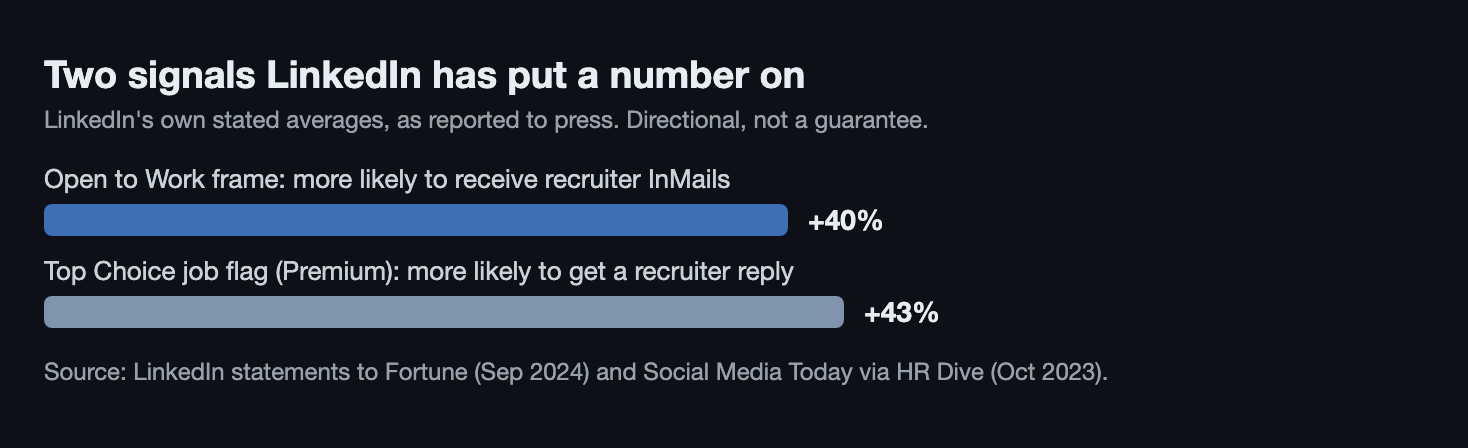
3. Open to Work, set to recruiters only. This is a literal input. LinkedIn's Recruiter documentation lists "LinkedIn members' job seeking signals, such as Open to work" among the inputs to Recommended Matches, and Recruiter has an Open to Work spotlight filter at the top of search results. You don't need the green frame: candidates who share with recruiters only "will still appear in an Open to work spotlight search," just without the photo badge. LinkedIn told Fortune in 2024 that members using the frame are on average 40% more likely to receive recruiter InMails. Set it, fill in the role types and locations, and skip the frame if you're employed.
4. Your reply rate to recruiters. Remember the objective: InMail Accept. A profile that never answers is a profile the model learns to rank lower, because it's optimizing for responses. Reply to every recruiter message, including the irrelevant ones, even if the reply is "not this one, but I'm open to X." You are training the model that messaging you produces a response.
5. What other recruiters did with you. The feedback loop is explicit. LinkedIn: "Saving or messaging candidates provides a positive signal on a potential fit, while hiding candidates provides a negative signal." The Top Applicant feature on the job-seeker side is built partly on "recruiter feedback on previous applicants to similar jobs." You can't control this directly. You control it indirectly by only surfacing for roles you actually fit, which is the case for signals 1 through 3.
6. Location. Named as a ranking factor in the 2019 engineering post, a default filter in the help center, and a hard gate for Skills Match: "the applicant and the job must be in the same country." If your profile location is where you used to live, you're being ranked for the wrong market.
7. Profile completeness and activity. LinkedIn's language here is deliberately soft: adding recommended sections "helps improve the discoverability of your profile in search results." The profile level meter (Beginner, Intermediate, All-star) is visible only to you. Fill the sections because they feed signals 1 and 2, not because of the mythical 40x. Activity gets one mention in the help center, as one of the factors that can influence result order, alongside your connections.
What LinkedIn says its own signals are worth
The score you can see is the wrong one
Every few months someone rediscovers the Social Selling Index and posts it as "LinkedIn's secret score." It's real, it's 0 to 100, and LinkedIn will show it to you. It's also a sales tool. LinkedIn defines it as how well "social sellers establish a professional brand, find the right prospects, engage with key insights, and build relationships." Nothing in the Recruiter search documentation references it. A high SSI means you'd be good at selling on LinkedIn. It says nothing about whether a recruiter searching "staff engineer, payments, New York" sees you on page one or page five.
The applicant side is ranked too
Being found is half of it. When you apply, you're ranked again.
LinkedIn's Top Applicant badge appears only "if you're in the top 50% of applicants for at least one role," needs at least 10 applicants, and draws on "your profile information, the job posting criteria, and recruiter feedback on previous applicants to similar jobs." Premium shows applicants "your ranking compared to other applicants, shown as a percentage if you're within the top 50%," with the caveat that the ranking "is based on LinkedIn data and is not endorsed by the hiring company."
And since late 2024 the recruiter on the other end may be an agent. LinkedIn's Hiring Assistant "helps evaluate thousands of applicants from LinkedIn and your ATS in minutes" and "surfaces top candidates along with their relevant skills and experience." It went globally available in September 2025. It reads the same profile signals as the search model, which means the seven items above now decide two things: whether you're found, and whether your application survives the first machine pass.
Volume is why. LinkedIn's own about page puts applications at roughly 8,200 a minute, and a LinkedIn representative told CNBC last October the number had grown more than 45% in a year. Nobody is reading those by hand. The profile is the résumé now, and it's read by a model before any human sees it. That's the same loop we described in why hiring broke: both sides automated, and the only thing that still gets through is a clean signal.
What to change first
In this order. The first three take about an hour and move most of the ranking you control.
Tonight. Rewrite your Skills section using LinkedIn's standardized skill names for the roles you want, and put the five that recruiters would search for at the top. Rewrite your headline as a standard title plus stack plus domain. Set Open to Work to recruiters only, with role titles and locations filled in.
This week. Go through every recruiter message you've ignored and reply, even with a polite no. Fix your location to the market you're actually applying in. Add the missing profile sections the meter is asking for, because they feed the skills parser.
Ongoing. Apply only to roles you're genuinely a match for. Every hide from a recruiter is a negative signal the model remembers; every save or message is a positive one. Fewer, better-fit applications don't just work better on their own, they improve how you rank next time.
That last point is the one we built hirecomb around. It scores every new posting against your actual résumé before anything gets sent, so the applications that go out are the ones that generate saves and replies instead of hides. It also means you don't have to touch a Workday form to do it.
FAQ
Does LinkedIn really have a hidden score on my profile?
Not a single number you could look up, but yes, a ranking. LinkedIn's engineers have published that Recruiter search ranks matching candidates with machine-learned models trained on whether a recruiter's message gets a positive reply, and LinkedIn's help center says results are ordered differently for every searcher. The "score" is that model's output for you, recomputed on every search.
Should I use the #OpenToWork green frame?
Set Open to Work either way; it's a documented input to recruiter recommendations and the Open to Work spotlight filter. The frame is a separate choice. LinkedIn told Fortune that frame users get about 40% more recruiter InMails on average, but candidates who share with recruiters only still appear in the spotlight search without it. If you're employed, "recruiters only" gets you most of the benefit without broadcasting to your current company, though LinkedIn says it "can't guarantee complete privacy."
Is the "All-Star profiles are 40x more likely to get opportunities" stat true?
We couldn't find any LinkedIn page that says it, and neither can anyone who cites it. LinkedIn's actual language about profile completeness is that adding sections "helps improve the discoverability of your profile." The verifiable skills number is smaller and more useful: members with at least one skill listed get up to 2x more views and up to 4x more messages, per LinkedIn's talent blog.
Sources: ranking factors and the InMail Accept objective, AI Behind LinkedIn Recruiter Search and Recommendation Systems, LinkedIn Engineering (2019), and Building Representative Talent Search at LinkedIn (2018). Per-searcher ordering, LinkedIn Recruiter Help: search relevance and LinkedIn Help: order of your profile in search results. Recommended Matches signals, LinkedIn Recruiter Help. Skills Match inputs, LinkedIn Recruiter Help: Skills Match filter; skills stats, LinkedIn Talent Blog (April 2024). Open to Work, LinkedIn Help and Recruiter Help; 40% InMail figure, LinkedIn statement to Fortune (September 2024). Top Applicant, LinkedIn Help; applicant ranking, LinkedIn Help: Premium insights; Top Choice 43% figure, LinkedIn statement via HR Dive (October 2023). Profile level meter, LinkedIn Help. Social Selling Index, LinkedIn Sales Solutions. Hiring Assistant, LinkedIn product page and HR Brew (September 2025). Application volume, LinkedIn About Us and CNBC (October 2025). LinkedIn changes these systems without notice; verify current behavior before relying on it.