Career Advice
hirecomb vs Sprout (2026): Two Price Tables and a Setting You Have to Find
David Eric ·

Sprout's homepage and Sprout's pricing page do not show the same prices. Start there, because it changes how you read everything else.
I build a competing tool, so weigh that. Everything below is what each product's own pages said on September 8, 2026.
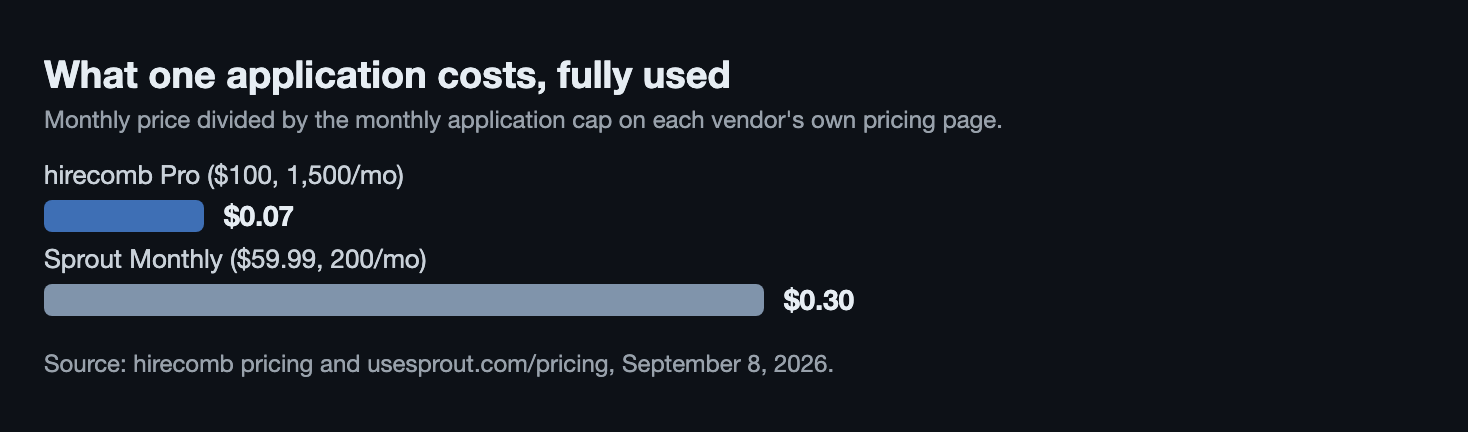
Pick Sprout if you want to apply from your phone, in one-week commitments, with the sending handled on someone else's servers while your laptop is shut. Pick hirecomb if cost per application is the number you care about and you want the submission to come from your own browser. We're at about 7 cents an application against Sprout's 30. The whole field is in our 22-tool comparison.
What Sprout actually is
A cloud and mobile agent with an iOS app, Sprout - AI Job Search. You swipe through matched roles and, in the vendor's words, "Sprout instantly fills and submits your application."
The word doing the work is instantly. Approval is a toggle, not a step. The AI Apply page says: "Nothing is ever submitted without your confirmation if you have the 'Require Approval' setting turned on." Leave that setting alone and applications go out on their own.
The pricing page lists Weekly at $29.99 for 50 applications a week, Monthly at $59.99 for 200 a month, and Quarterly at $119.99 for 600 over three months, marked down from $359.99.
The homepage lists something else: Basic $19.99, Pro $39.99 and Ultra $79.99 per week, at 20, 50 and 150 applications a week, with a monthly toggle showing 80, 200 and 600. Same site, two sets of numbers. We quote the pricing page, because that's where the buy button lands, but check which one your checkout screen agrees with.
One more line before you assume 200 means 200: "Each application uses 1 to 3 credits." Sprout doesn't say which ones cost three. No free tier on the site, no contracts, no named ATS coverage.
What hirecomb actually is
A web app plus a Chrome extension. The extension applies inside your own Chrome session: it opens the posting, fills the form from your profile and a résumé tailored to that posting, attaches the file, submits. You can watch it. If a captcha or an odd form stops it, the tab comes back with every known field filled and you click submit. We never ask for your job-site passwords.
Coverage is Greenhouse, Lever, Ashby and Workday, plus the guest-apply forms careers pages wrap around them. No LinkedIn Easy Apply.
Every new posting is scored against your actual résumé, not a keyword list. Before a send we rewrite that résumé in the posting's wording, show the ATS keyword score before and after, and run a verification pass that strips invented skills, tools and numbers. You approve every version, or send your original in one click.
Pace is deliberately slow: a daily cap you set at 10, 20, 25 or 50, and never more than 2 roles at one company in 24 hours, because ATSes reject shotgun applies and you just collect duplicate rejections. Everything sent lands in Applied Jobs with live status and follow-up reminders.
Plans: Basic $50/mo for 750 auto-applies, Pro $100/mo for 1,500, Ultra $150/mo for 3,000, plus a $10/mo Resume Tailor plan with no auto-apply. The trial is Pro, free for seven days with 20 real auto-applies.
The honest limitation: nothing sends while Chrome is closed.
Side by side
| Feature | hirecomb | Sprout |
|---|---|---|
| What it is | Web app + Chrome extension (browser agent) | Cloud and mobile agent, iOS app, swipe-to-apply |
| Where the applying runs | Your own Chrome, on your machine | Sprout's servers |
| Submits for you? | Yes | Yes, "instantly fills and submits" |
| Price | $50 / $100 / $150 per month | $29.99/wk, $59.99/mo, $119.99/quarter (pricing page); homepage shows a different table |
| Application cap | 750 / 1,500 / 3,000 per month; you set 10 to 50 a day | 50/wk, 200/mo, 600/quarter; each application uses 1 to 3 credits |
| Free tier / trial | 7-day Pro trial, 20 applies; free browsing and match scoring | None on the site |
| ATS or board coverage | Greenhouse, Lever, Ashby, Workday, plus guest-apply forms. No Easy Apply | Not published |
| Résumé tailoring | Per posting, with a fabrication check | Not published |
| Control before send | You approve every tailored résumé; captchas hand the tab back | Submits unless "Require Approval" is switched on |
| Restrictions | Chrome must be open. 2 roles per company per 24h | No contracts. Credit cost per application varies |
Where Sprout wins
→ A cheaper week. $29.99 buys seven days and 50 applications. Our smallest paid commitment is $50 for a month.
→ It applies while your laptop is closed. Sprout runs on its servers. We stop when your machine sleeps. If your only computer lives in a bag, that's a real point for them.
→ You pick each job by hand. Swiping is slower than a background queue, but you see every role before it goes.
→ It's a phone product. iOS app. We have none.
Where hirecomb wins
→ Cost per application. About 7 cents on Pro against about 30 on Sprout Monthly, before applications that cost two or three credits.
→ One price table, before the card. Ours is the same number everywhere. Sprout's two pages disagree, and that's better settled before renewal than after.
→ A résumé that can't invent things. Every tailored draft passes a check that strips claims you never made.
→ Named coverage and a real record. Four ATSes by name, every submission logged with live status. Sprout names none.
Who should pick which
Take Sprout if you're applying from your phone and you'd rather spend $29.99 on one week than commit to a month. Switch on "Require Approval" before your first swipe, and check which price table your checkout screen uses.
Take hirecomb if you're an engineer applying through career pages on Greenhouse, Lever, Ashby or Workday, and you'd rather send 750 tailored applications for $50 than 200 for $59.99. You'll need to leave Chrome open. In exchange each application is genuinely from your browser, checked for invented claims, capped at two per company, and recorded.
FAQ
Is Sprout worth it?
At $59.99 a month for 200 applications it works out near 30 cents each, against a category that runs from about 2 cents to 40. That buys a mobile, swipe-driven product that keeps working while your computer is off, and a $29.99 weekly plan you can quit after seven days. It doesn't buy a published ATS list or one consistent price table across the site.
Does Sprout actually submit applications?
Yes, from its own servers: the AI Apply page says it "instantly fills and submits your application." The detail to catch is that confirmation is opt-in. "Nothing is ever submitted without your confirmation if you have the 'Require Approval' setting turned on." With that setting off, applications go out without a confirmation step.
What's the difference between hirecomb and Sprout?
Where the applying happens, and what it costs. Sprout submits from the cloud, so it works while your laptop is shut, at about 30 cents an application on the monthly plan. hirecomb submits from your own Chrome session at about 7 cents on Pro, names its four ATSes, and tailors a résumé per posting with a fabrication check. The trade is that hirecomb stops when your browser closes.
Sources: Sprout pricing and Sprout AI Apply, checked September 8, 2026. hirecomb details are our own live pricing. For the full 22-tool table, see hirecomb vs every other auto-apply tool. Prices in this category change monthly; check the vendor page before relying on a number.